$59.83
$73.59
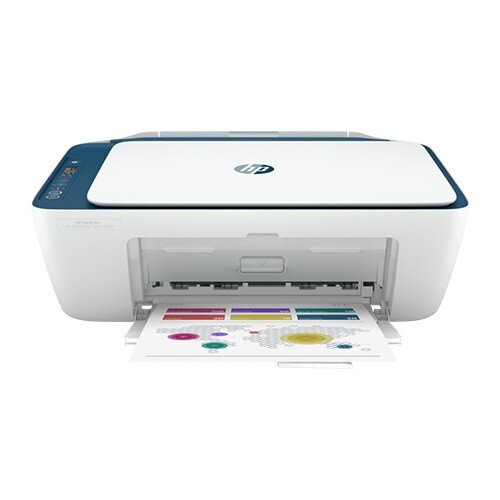
Description Specifications Functions Print, copy, scan, wireless Print speed black (ISO) Up to 7.5 ppm 1 Print speed black (draft, A4) Up to 20 ppm 1 Print speed black (ISO, A4) Up to 8.5 ppm 1 Print speed color (ISO) Up to 5.5 ppm 1 Print speed color (draft, A4) Up to 16 ppm 1 Print Speed Color (ISO) Up to 5.5 ppm 1 First page out black (A4, ready) As fast as 15 sec First page out color (A4, ready) As fast as 19 sec Duplex printing Manual (driver support provided) Duty cycle (monthly, letter) Up to 1000 pagesUp to 1000 pages Duty cycle (monthly, A4) Up to 1000 pages Recommended monthly page volume 50 to 100 Print quality black (best) Up to 1200 x 1200 rendered dpi Print quality color (best) Up to 4800 x 1200 optimized dpi color (when printing from a computer on selected HP photo papers and 1200 input dpi) Print languages HP PCL 3 GUI; HP PCLm (HP Apps/UPD); URF (AirPrint) Print technology HP Thermal Inkjet Connectivity, standard 1 Hi-Speed USB 2.0 Mobile printing capability Apple AirPrint; Mopria Print Service; Chrome OS; HP Smart app 2 Network capabilities Yes, built-in Wi-Fi 802.11a/b/g/n Wireless capability Yes, built-in Wi-Fi 802.11a/b/g/n Wireless technologies 802.11b/g/n/a Minimum System Requirements for Macintosh macOS v10.14 Mojave, macOS v10.15 Catalina, macOS v11 Big Sur; 2 GB HD Minimum System Requirements Windows 10, 7: 32-bit or 64-bit, 2 GB available hard disk space Digital sending standard features No Display Icon LCD display Processor speed 180 MHz Maximum Memory 64 MB DDR1; 20 MB flash Memory 64 MB Memory card compatibility No Internal Storage No Compatible Operating Systems Windows 11; Windows 10; Windows 7; macOS 10.12 Sierra; macOS 10.14 Mojave; macOS 10.15 Catalina; macOS 11 Big Sur; Chrome OS Paper handling input, standard 60-sheet input tray Paper handling output, standard 25-sheet output tray Paper handling input, optional Not Applicable Paper handling output, optional Not Applicable Finished output handling Sheetfed Media types Plain paper, photo paper, brochure paper, envelopes and other specialty inkjet papers Media sizes supported A4; B5; A6; DL envelope Borderless printing No Media weight, recommended 74 g/m² Scanner type Flatbed Scan file format JPEG, TIFF, PDF, BMP, PNG Scan resolution, optical Up to 1200 dpi Scan size, maximum 216 x 297 mm Scan speed duplex (normal, A4) N/A Scan speed duplex (normal, letter) N/A Scan speed (normal, letter) N/A Scan technology Contact Image Sensor (CIS) Copy speed black (ISO) Up to 6 cpm 3 Copy speed color (ISO) Up to 3 cpm 3 Copy resolution (black text) Up to 300 x 300 dpi Copy resolution (color text and graphics) Up to 300 x 300 dpi Copy resolution (black graphics) Up to 300 x 300 dpi Copies, maximum Up to 9 copies Copy reduce / enlarge settings Via HP Smart app Copier settings Auto-enlarge Power consumption 1.0 watts (sleep), 0.1 watts (off), 0.1 watts (auto-off) 4 Power Input voltage: 200 to 240 VAC ( /- 10%), 50/60 Hz ( /- 3Hz) Operating humidity range 15 to 80% RH (non-condensing) Recommended operating humidity range 20 to 80% RH (non-condensing) Non-Operating Humidity Range 5 to 90% RH (non-condensing) Operating temperature range 5 to 40°C Operating temperature range 41 to 104°F Typical electricity consumption (TEC) number 0.17 kWh/Week Ecolabels No Energy star certified Yes Safety IEC 60950-1:2005 A1:2009 A2:2013, EN 60950-1:2006 A11:2009 A1:2010 A12:2011 A2:2013, IEC 62368-1:2014, EN 62368-1:2014 A11:2017, EN 62479:2010, EN 62311:2007 Minimum dimensions (W x D x H) 424 x 410 x 245 mm 5 Maximum dimensions (W x D x H) 424 x 555 x 245 mm Output Extension full out 5 Weight 3.42 kg Product color Indigo What’s in the box HP DeskJet Ink Advantage Ultra 4828 All-in-One Printer; 2 x HP 47 Black Cartridge; 2 x HP 47 Tri-Color Ink Cartridge; Setup guide; Reference guide; Power cord [For ink volume and page yield information,visit http://hp.com/go/learnaboutsupplies ] Number of print cartridges 2 black, 2 tri-color Replacement cartridges HP 47 Black Original Cartridge (~1,500 pgs yield) 6ZD21AE; HP 47 Tri-color Original Cartridge (~750 pgs yield) 6ZD61AE HP DeskJet Ink Advantage Ultra 4828 All-in-One Printer (25R76A) All the basics, now with easy-to-use features and ultra-low cost ink cartridges. Print, scan, and copy everyday documents, and get worry-free wireless. 1 Simple setup with HP Smart app means you’re ready to go on any device. Simple setup. Simple printing. Use your smartphone to set up in a few easy steps, then connect and print from any device, using HP Smart app. 4 Get versatile performance to print, scan, and copy with ease Worry-free wireless 5 Designed to help keep you connected. Dual-band Wi-Fi® with self-reset enables better range and faster, more reliable connections. 5 Plus, you can easily connect through your USB port. Up to 2,600 black and 1,400 colour pages in the box 4 Depend on ultra low-cost Original HP ink cartridges to deliver the crisp text and vivid colors you expect, page after page. Get up to 2,600 black and 1,400 colour pages in the box, 4 and help save on printing by avoiding reprints. All the essentials with ultra-low cost ink cartridges, easy setup, 2 and worry-free wireless. Seamless setup Get started fast with simple setup that guides you through each step, using HP Smart app Your reliable connection Get better range and faster, more reliable connections using dual-band Wi-Fi® with self-reset. Printing from your smartphone just got easier Easily print everyday documents from your smartphone, using HP Smart app. Amazing scanning, now on your smartphone With HP Smart app, get high-quality scanning and sharing – plus easily make copies – from your smartphone.
Printer